
OI7MI
[JavaScript] 현재 위치 날씨 가져오기 (Geolocation + OpenWeatherMap) 본문
[JavaScript] 현재 위치 날씨 가져오기 (Geolocation + OpenWeatherMap)
OI7MI 2025. 12. 16. 06:10
Geolocation.getCurrentPosition() - Web API | MDN
developer.mozilla.org
Weather API - OpenWeatherMap
Please, sign up to use our fast and easy-to-work weather APIs. As a start to use OpenWeather products, we recommend our One Call API 3.0. For more functionality, please consider our products, which are included in professional collections.
openweathermap.org
브라우저에서 현재 위치 가져오기
브라우저는 Geolocation API를 통해 사용자의 현재 위치(위도, 경도)를 제공한다.
이 기능은 HTTPS 환경에서만 동작한다.
navigator.geolocation.getCurrentPosition(success, error);
getCurrentPosition 특징
- 인자로 2개의 함수를 받는다.
- 위치를 성공적으로 가져왔을 때 실행될 함수
- 위치를 가져오지 못했을 때 실행될 함수
- 성공 시 위도(latitude) 와 경도(longitude) 값을 제공한다.
예제 코드
// 위치를 성공적으로 가져왔을 때
function onGeoOk(position){
    const lat = position.coords.latitude;
    const lng = position.coords.longitude;

	console.log(lat, lng);
}

// 위치를 가져오지 못했을 때
function onGeoError(){
	alert("Can't find you. No weather for you.");
}

navigator.geolocation.getCurrentPosition(onGeoOk, onGeoError);
이 짧은 코드만으로도 사용자의 현재 위치(위도, 경도) 를 알 수 있다.
위도 · 경도로 날씨 정보 가져오기 (Geolocation API)
Geolocation API로 얻은 값은 숫자(위도, 경도) 이기 때문에
사람이 바로 이해할 수 있는 장소 정보나 날씨로 변환하려면 외부 서비스(API) 가 필요하다.
이때 사용하는 것이 OpenWeatherMap API이다.
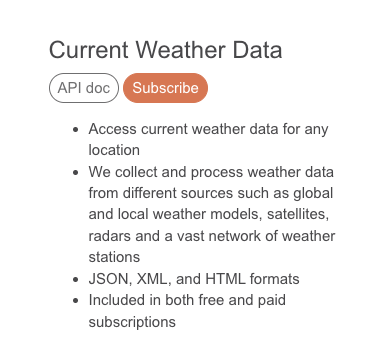
OpenWeatherMap Current Weather Data API
OpenWeatherMap의 Current Weather Data API를 사용하면
위도(latitude) 와 경도(longitude) 를 기준으로 해당 위치의 현재 날씨 정보를 받아올 수 있다.
API 요청 결과는 JSON 형식으로 반환된다.
오픈 API(Open API)란?
개발을 하다 보면 직접 수집하기 어려운 데이터들이 있다.
예를 들면 버스 도착 정보, 날씨 정보, 공공기관 데이터 등이 있다.
이러한 데이터는 대부분 국가, 기업, 기관에서 보유하고 있으며, 외부 개발자들이 사용할 수 있도록 공개된 인터페이스 형태로 제공한다.이처럼 외부에서 데이터를 요청하고 응답받을 수 있도록 공개된 API를 오픈 API(Open API) 라고 한다.
OpenWeatherMap API 사용 방법
1️⃣ OpenWeatherMap 사이트 가입 https://openweathermap.org/
2️⃣ 로그인 후 API Key 발급
회원가입 및 로그인 -> 대시보드에서 API Key 발급 (이 키는 API 요청 시 본인 인증 용도로 사용됨)

3️⃣ Current Weather Data API 사용
OpenWeatherMap 사이트에서 API → Current Weather Data 메뉴를 선택하면 API 사용 방법을 확인할 수 있다.
기본 요청 URL 형태는 다음과 같다.
https://api.openweathermap.org/data/2.5/weather?lat={lat}&lon={lon}&appid={API key}- {lat} → 위도(latitude)
- {lon} → 경도(longitude)
- {API key} → 발급받은 API Key
해당 값들을 실제 값으로 바꾸어 요청하면 JSON 형태의 현재 날씨 데이터가 응답으로 반환된다.
fetch를 이용해 날씨 데이터 가져오기
import { API_KEY } from "./config.js"
function onGeoOk(position){
    const lat = position.coords.latitude;
    const lon = position.coords.longitude;
    const url = `https://api.openweathermap.org/data/2.5/weather?lat=${lat}&lon=${lon}&appid=${API_KEY}`
    fetch(url)
}
fetch()를 통해 서버로 API 요청을 보내면 해당 요청(Request)과 서버의 응답(Response)이 브라우저 개발자 도구의 Network 탭에 기록된다.

날씨 API 요청 시 units 옵션을 URL에 함께 전달하면 온도 단위를 지정할 수 있다.
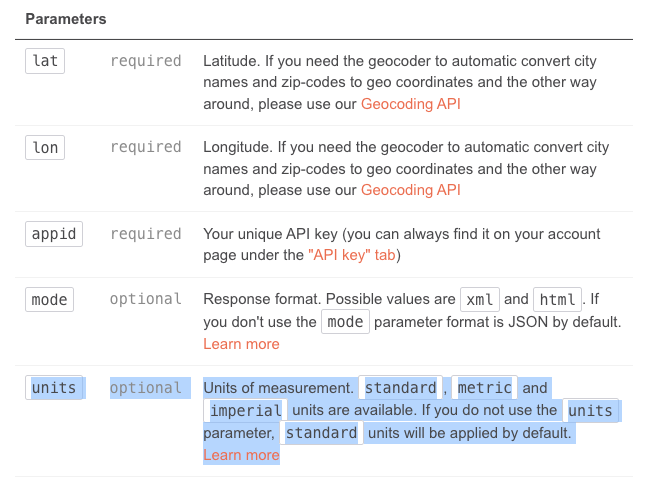
&units=metric
// 위 옵션을 URL에 추가하면 기본값인 켈빈(K)이 아닌 섭씨(°C) 기준의 온도를 받을 수 있다.


const url = `https://api.openweathermap.org/data/2.5/weather?lat=${lat}&lon=${lon}&appid=${API_KEY}&units=metric`
마지막으로 fetch를 이용해 날씨 데이터 가져오기
날씨 API는 fetch()를 통해 요청하며, 응답 데이터는 Promise 형태로 반환되기 때문에 .then()을 사용해 처리한다.
    fetch(url)
    .then(response => response.json())
    .then(data=> {
        const name = data.name; // 지역
        const weather = data.weather[0].main; // 날씨
    })
💡 TIP
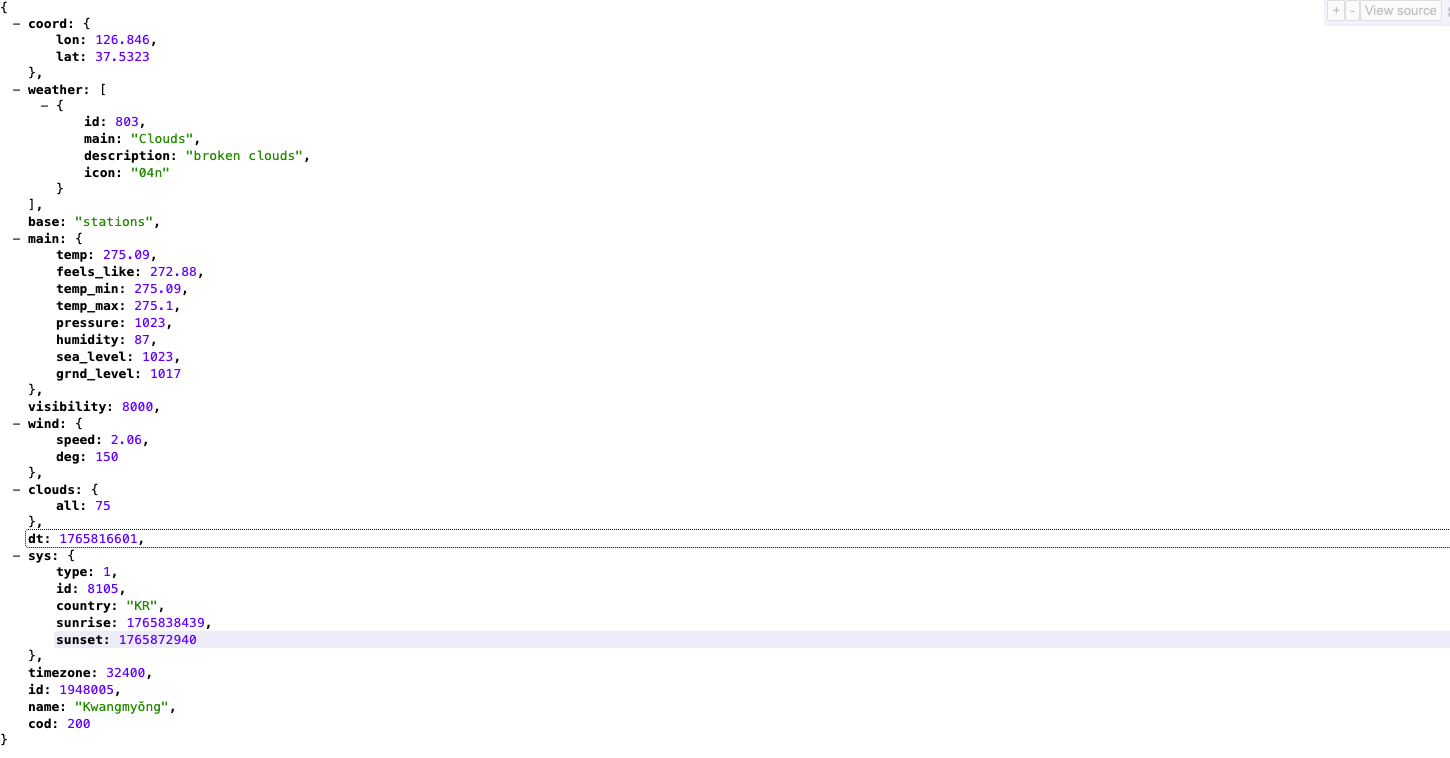
OpenWeatherMap API 요청 링크를 브라우저에서 직접 열었을 때
JSON 데이터가 한 줄로 복잡하게 보일 수 있다.

이 경우 크롬 확장 프로그램 JSON Viewer 를 설치하면 JSON 데이터를 트리 구조로 깔끔하게 확인할 수 있다.

'프론트엔드 > JavaScript' 카테고리의 다른 글
| [JavaScript] filter() – 배열에서 특정 값 제거하기 (0) | 2025.12.15 |
|---|---|
| [JavaScript] localStorage 저장하기 JSON.stringify(), JSON.parse() (0) | 2025.12.10 |
| [JavaScript] append() vs appendChild() 차이 (0) | 2025.12.10 |
| [JavaScript] setTimeout과 setInterval 차이 (0) | 2025.12.07 |
| [JavaScript] 브라우저 기본 동작 제어 : preventDefault() (1) | 2025.12.02 |


